
DisplayPort vs HDMI – Which Connector is Best for Embedded and Industrial Devices?

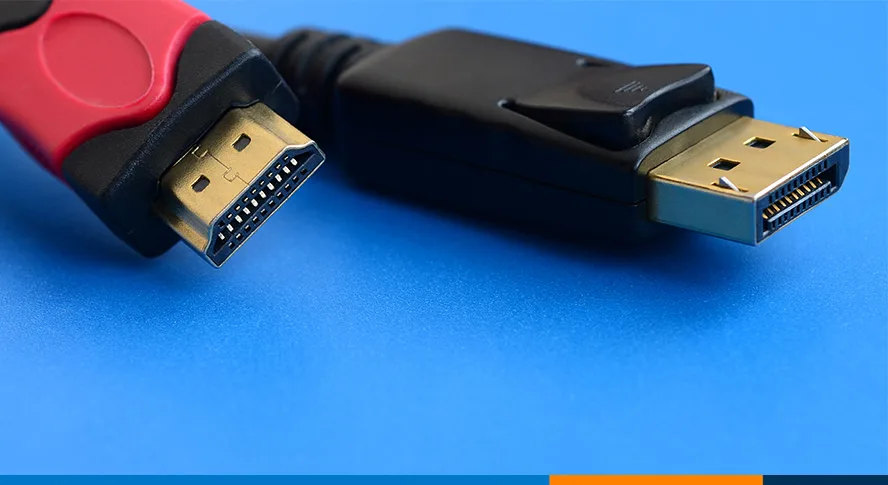
Looking to connect a monitor to your computer and unsure whether you should use the DisplayPort or HDMI connector? They are both high definition media ports which can carry HD video and audio. Furthermore, the standards for the ports were established in the early 2000s and they are sometimes referenced interchangeably. However, there are key differences worth knowing between DisplayPort vs HDMI. Once you understand the differences, you’ll be better equipped to decide which one is best suited for your application.
What is HDMI?
High Definition Multimedia Interface, or HDMI, is a proprietary audio/video interface created by a group of technology companies and currently managed by the HDMI Forum. You’ll find that HDMI is most common on TVs or displays and is the most frequently used interface for transferring both high definition audio and video over a single cable.
Fun fact – 10 companies were given a Technology and Engineering Emmy Award for their development of HDMI by the National Academy of Television Arts and Sciences. They were awarded for the Consumer Electronics Control (CEC) feature that allows control of up to 15 CEC-enabled devices (connected through HDMI) through a single remote control. Remember how excited you were when you learned you could control your television and DVD player with a single remote control? You can thank the HDMI engineers for that!
What is DisplayPort?
DisplayPort is a digital display interface that you can use to connect a video source to a display device – it is most frequently used for computer monitors. It was developed by a consortium of PC and chip manufacturers and standardized by the Video Electronics Standards Association (VESA). If VESA sounds familiar, it’s the same organization that created the VESA Mounting standard for mounting TVs, monitors and panel PCs. You can use DisplayPort to transmit audio and video simultaneously, although each can be transmitted without the other if desired.
DisplayPort vs HDMI versions
Let’s compare features of the different versions of DisplayPort vs HDMI. Features such as maximum resolution and refresh rate depend on the specific version of DisplayPort or HDMI used. VESA announced version 2.1 of the DisplayPort standard on October 17, 2022. Nevertheless, it will be a few months until you see monitors and cables that can support this standard. The HDMI forum released the most recent version of HDMI, also 2.1, in January 2017.
| Max resolution supported | Max number of displays | Max data transmission rate (Gbit/s) |
|---|---|---|---|
DisplayPort 1.4-1.4a | 4K @ 120HZ – HDR 8K @ 60Hz – HDR | 4 | 32.4 |
DisplayPort 2.1 | 16K @ 60Hz – HDR 10K @ 80Hz – no HDR | 4 | 80 |
HDMI 1.4-1.4b | 1080p @120Hz 4K@30Hz | 1 | 10.2 |
HDMI 2.0-2.0b | 4K@60Hz – HDR | 1 | 18 |
HDMI 2.1-2.1b | 4K@120Hz – HDR 8K@60Hz - HDR | 1 | 48 |
DisplayPort and HDMI connectors
The connectors for both DisplayPort and HDMI look similar. However, HDMI uses a 19-pin cable while DisplayPort has 20 pins. In addition, they both come in full size and mini HDMI and mini DisplayPort versions. While the mini connectors are less common, they do allow for the inclusion of full HD video connectivity in compact systems where motherboard real estate would prohibit the use of a full-size port.


What is multi-stream transport (MST)?
Multi-stream transport, or MST, is a feature of DisplayPort. It allows you to connect multiple displays to a single DisplayPort connector. You can do this through the use of daisy-chaining one monitor to another, or through an external hub. Remember that the maximum supported video resolution and number of monitors will depend on your graphics card. A MST Hub supports different modes for multi monitor display:
Mirror Mode: Displays the same image on each monitor
Extended desktop mode: Displays a different image on each monitor
Video wall mode: Displays one large image across multiple monitors

DisplayPort vs HDMI – which is better for embedded and industrial use cases?
There are 3 features of DisplayPort that make it the better choice for embedded and industrial use cases.
DisplayPort offers a button-operated latching solution. This keeps the cable securely connected to the system in the event of mechanical shock or vibration.
DisplayPort 1.4 and above supports 4 displays per cable. That feature plus MST make it a great choice for multiple monitor displays for digital signage or
This content model can not be used as a hyperlink: redirectUrls
.Both DisplayPort and HDMI can be adapted to a number of different video interfaces using passive or active adapters, although DisplayPort is more easily adapted to analog interfaces like VGA or DVI.
At the end of the day, either HDMI or DisplayPort offer a viable option for HD video and audio connections. For industrial and embedded computer systems, DisplayPort offers some additional nuance that gives it the edge.
Do you have additional questions about the best connector for your solution? Contact our technical sales team today!
Note: We originally posted this on December 7, 2022. We updated it for content on July 28, 2023
